Audio player is stuck behind the launcher home page
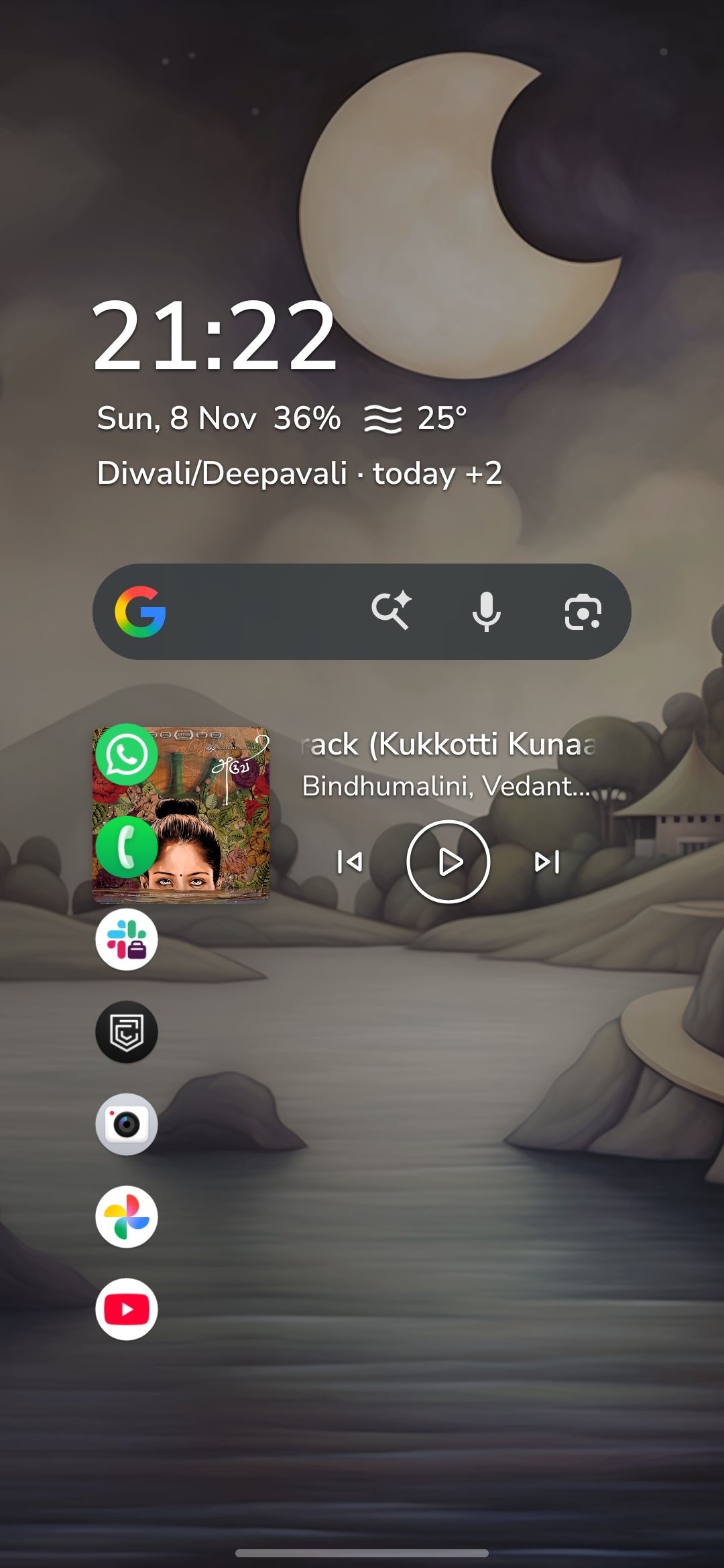
Somehow my audio player widget is stuck behind the favorite menu. I cannot remove the audio player widget. It is behind the whole menu.
- Manufacturer and Device Name
- Android Version
- Problem occurs with other Launchers
- Niagara Launcher Version
Log in to comment and vote
Comments1
Surfer Bot
Nov 9
Thanks for the screenshot! It shows the media player drawn on top of your first favorites (WhatsApp and Phone). Normally the player pushes the favorites further down instead of covering them, so this looks like a layout glitch.
To get rid of it for now: Niagara shows the player as long as Android shows a media player in the notification shade (on Samsung it can sit in the media section of the quick settings), so once it's gone from there, it leaves the home screen too. If you don't need it, you can also switch it off under Niagara Settings > Productivity > Media Player. More in Integrated Media Player.
Your form says you're on Niagara 1.16.13, and the current version is 1.16.36. Could you update via the Play Store and let us know here whether the overlap still happens afterward?